
Blog Redesign
Improving copy readability through research-backed web design
Year
2023
Summary
I redesigned the company blog to make it easier for readers to skim articles and find the information they need.
Company
NexiGo
Blog Redesign
Improving copy readability through research-backed web design
Year
2023
Summary
I redesigned the company blog to make it easier for readers to skim articles and find the information they need.
Company
NexiGo
Designing a blog page for the 15-second reader
The NexiGo "Conversations" blog is a place people come to for answers. Frequent topics include product support, how-to tutorials, buying guides, and clear explanations of niche technology.
This type of content thrives on strong information hierarchy, parallel structure, clear language, and easy navigation to guide the reader through complex topics.
The problem was that the design of the blog was hurting its own readability. The headers were barely larger than the body text, so they didn’t stand out. The text was too small and gray, making it difficult to read. The images felt too small within a sea of text.
These formatting issues were costly. The average reader spends only 15 seconds on an article before clicking away, and poor visual hierarchy meant our readers were leaving before finding what they came for.
The NexiGo "Conversations" blog is a place people come to for answers. Frequent topics include product support, how-to tutorials, buying guides, and clear explanations of niche technology.
This type of content thrives on strong information hierarchy, parallel structure, clear language, and easy navigation to guide the reader through complex topics.
The problem was that the design of the blog was hurting its own readability. The headers were barely larger than the body text, so they didn’t stand out. The text was too small and gray, making it difficult to read. The images felt too small within a sea of text.
These formatting issues were costly. The average reader spends only 15 seconds on an article before clicking away, and poor visual hierarchy meant our readers were leaving before finding what they came for.
My role
I identified an opportunity to improve readability and proposed the redesign independently.
I identified an opportunity to improve readability and proposed the redesign independently.
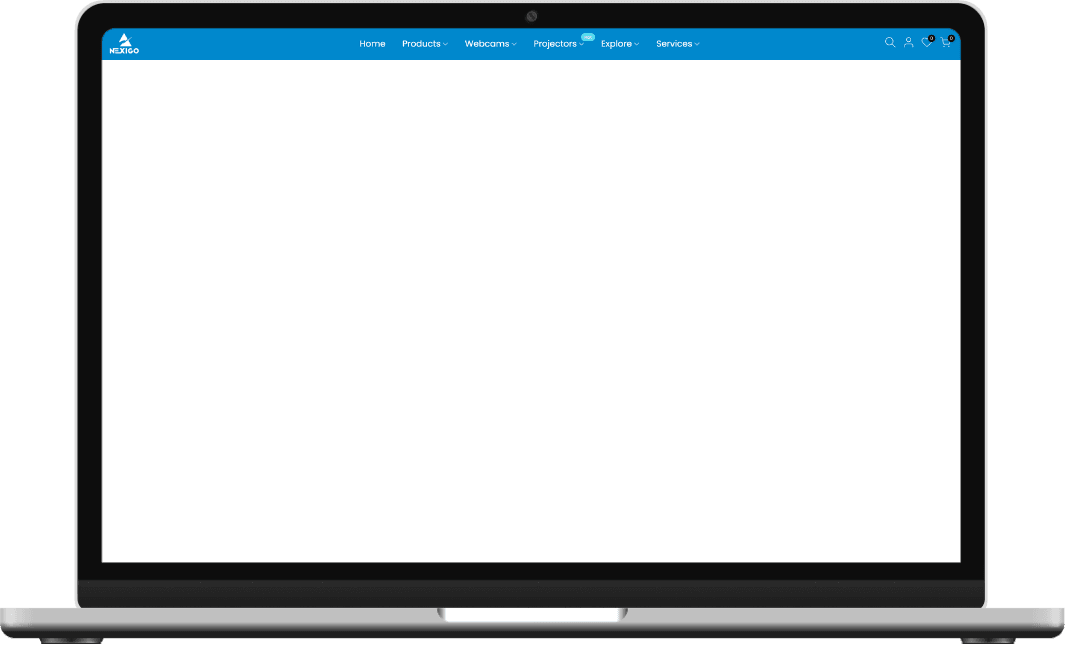
Before
No thumbnail
Small images
Wide text
Flat heading
structure
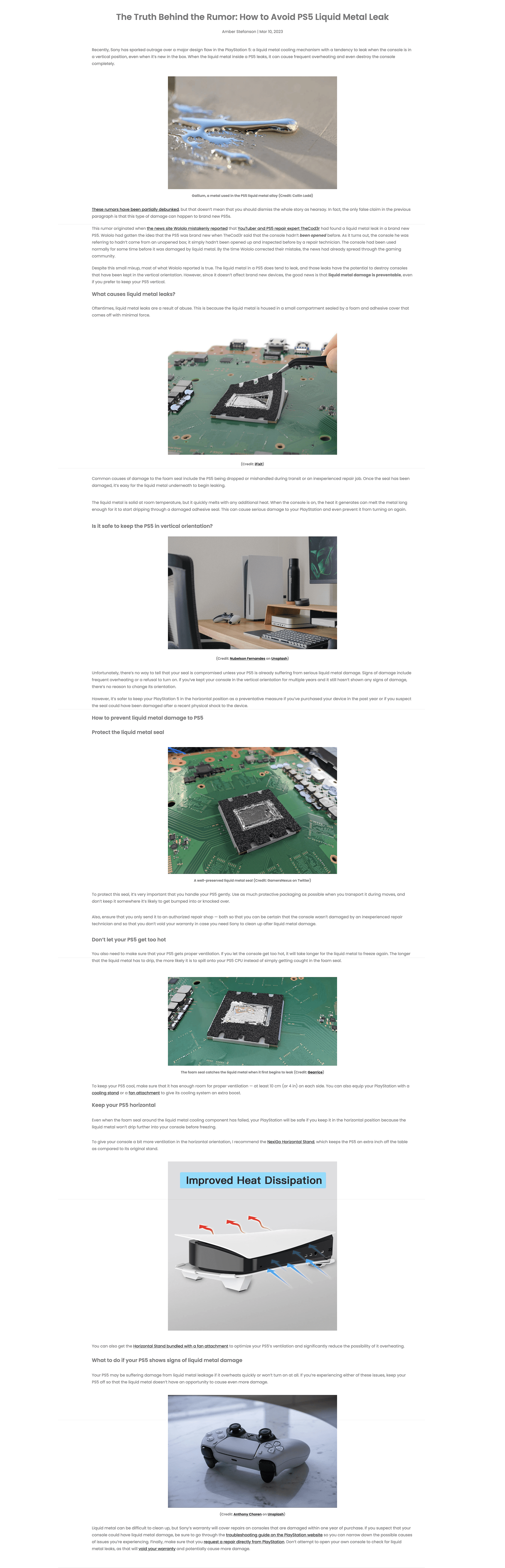
After
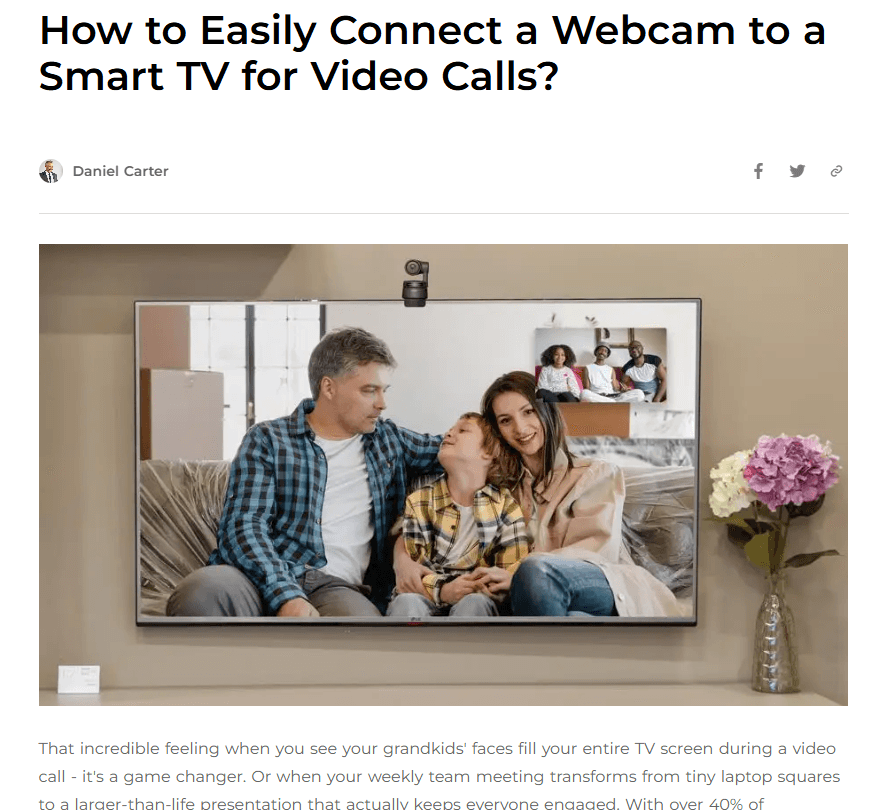
Thumbnail
Narrow text
Sticky navigation
Bolded keywords
Good visual
hierarchy


Discovery Process
I began the process by reading studies on attention span, reading patterns, and information design. I also analyzed the layout of blogs by other consumer technology brands, independent review sites, and blogs the founder had flagged as references for the kind of reading experience he wanted.
I began the process by reading studies on attention span, reading patterns, and information design. I also analyzed the layout of blogs by other consumer technology brands, independent review sites, and blogs the founder had flagged as references for the kind of reading experience he wanted.
Research Findings
After reading through studies by Pew Research, Nielsen & Norman, and others, I found that:
After reading through studies by Pew Research, Nielsen & Norman, and others, I found that:
The average reader spends only 15 seconds on an article before clicking away
Most people scan in an F-shaped pattern
60–70 characters per line is ideal for readability
The average reader spends only 15 seconds on an article before clicking away
Most people scan in an F-shaped pattern
60–70 characters per line is ideal for readability
Building a Moodboard
I built a moodboard from various blogs of styles and features I wanted to recreate on our own blog.
I built a moodboard from various blogs of styles and features I wanted to recreate on our own blog.


Narrow Text Area
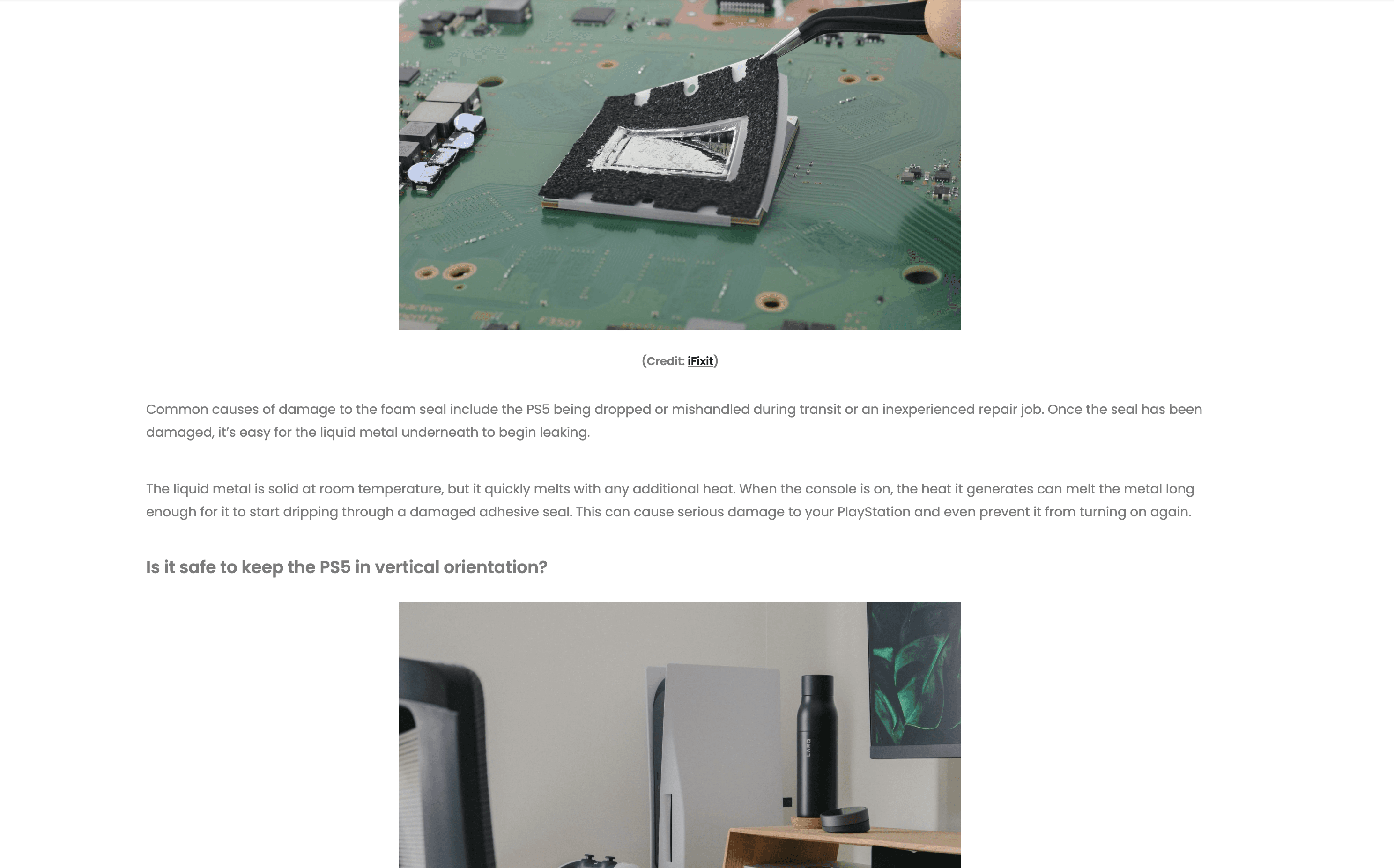
Most people don't read; they scan. Online, people tend to follow an F-shaped pattern when they scan, meaning the narrower the text area, the more text that they actually read.
60–70 characters per line is the sweet spot for digital publications. At this length, readers catch more text without feeling annoyed or distracted by excessive line breaks.
I reduced the text area to around 60 characters, effectively making readers interact with ~10% more content when they scan for information.
The narrower text also enabled me to make the images full width, preventing the reader’s eyes from having to jump around the page and making the whole site feel more cohesive.
Most people don't read; they scan. Online, people tend to follow an F-shaped pattern when they scan, meaning the narrower the text area, the more text that they actually read.
60–70 characters per line is the sweet spot for digital publications. At this length, readers catch more text without feeling annoyed or distracted by excessive line breaks.
I reduced the text area to around 60 characters, effectively making readers interact with ~10% more content when they scan for information.
The narrower text also enabled me to make the images full width, preventing the reader’s eyes from having to jump around the page and making the whole site feel more cohesive.
Before
After
Sticky Navigation Bar
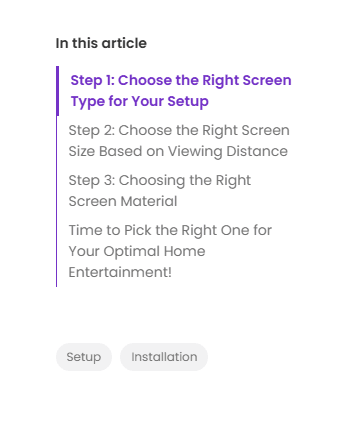
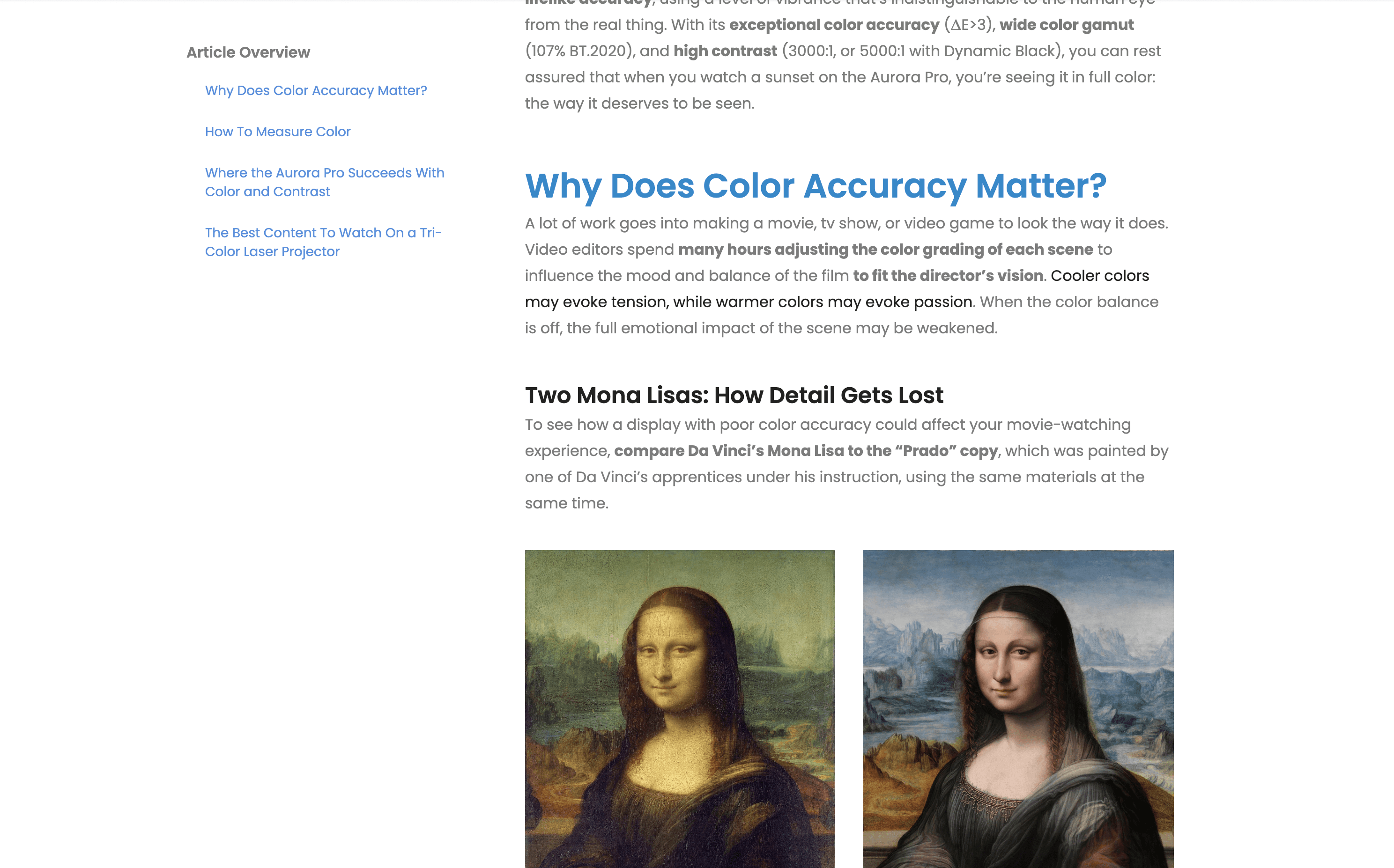
I wanted to give readers a roadmap of the content they’re about to consume. The topics act as buttons that readers can click on to skip ahead to the information they need.
That way, readers can find information quickly and read in an order that makes sense for them.
Improved Hierarchy
The next issue was text hierarchy. The headings didn't stand out, and key information was buried inside dense paragraphs.
The next issue was text hierarchy. The headings didn't stand out, and key information was buried inside dense paragraphs.
Multiple Distinct Heading Styles
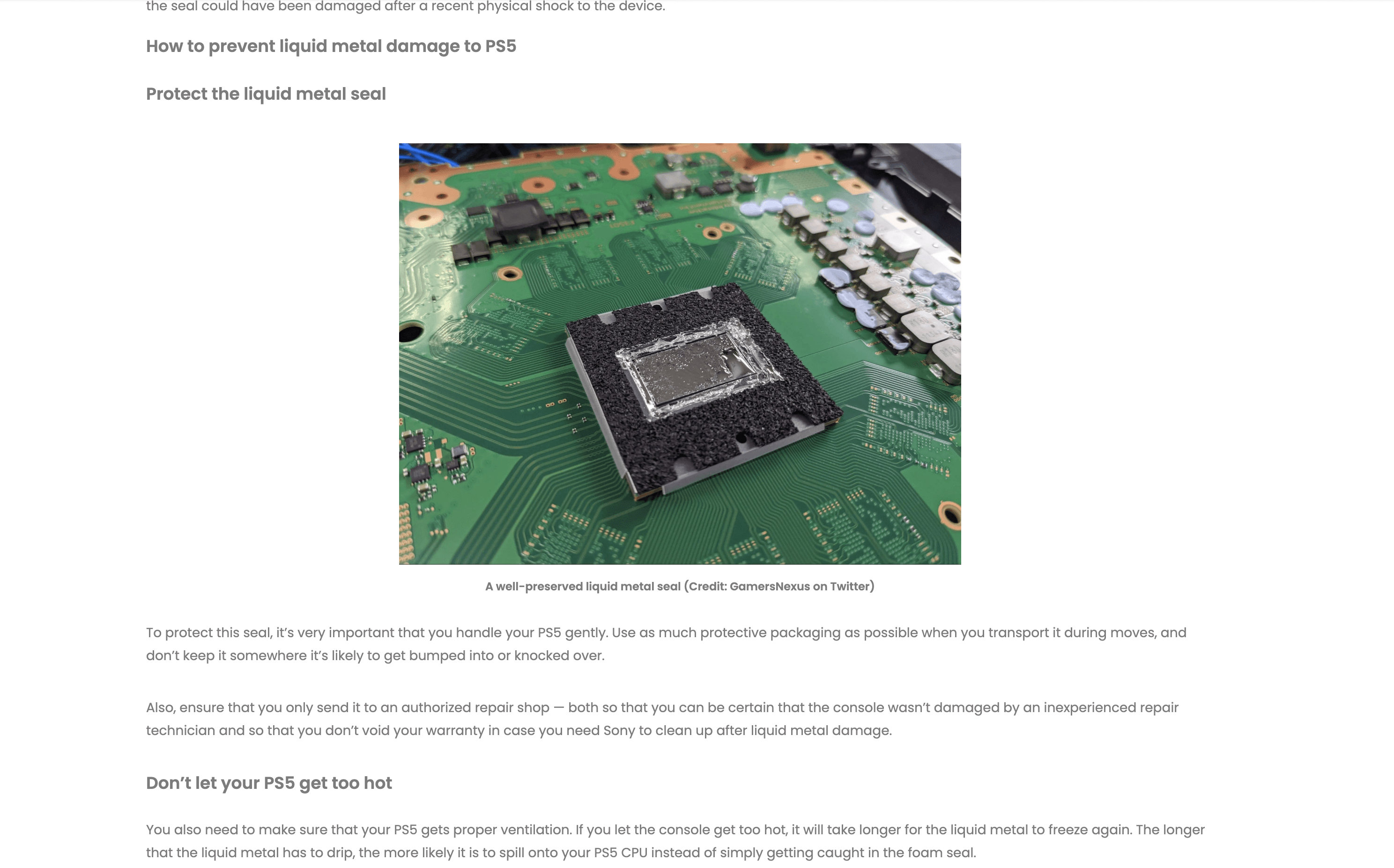
Previously, the H1 was barely bigger than the body text and H2 was body text, but bolded. This flat heading structure also meant that it was impossible to use H3 at all.
Without clear visual hierarchy, readers had no way to quickly orient themselves within a long article.
To address this issue, I set the default H1, H2, and H3 headings with distinct font sizes and colors. The result was a clear visual hierarchy that let readers scan headlines at a glance and understand the structure of an article before reading a single word.
Previously, the H1 was barely bigger than the body text and H2 was body text, but bolded. This flat heading structure also meant that it was impossible to use H3 at all.
Without clear visual hierarchy, readers had no way to quickly orient themselves within a long article.
To address this issue, I set the default H1, H2, and H3 headings with distinct font sizes and colors. The result was a clear visual hierarchy that let readers scan headlines at a glance and understand the structure of an article before reading a single word.
Before
After

Thumbnail as a Hero Image
Without a hero image, readers who clicked into a blog based on the thumbnail would have no visual confirmation that they landed on the right page. The thumbnail that drove them to click should be the first thing they see.
Without a hero image, readers who clicked into a blog based on the thumbnail would have no visual confirmation that they landed on the right page. The thumbnail that drove them to click should be the first thing they see.
Templated Format
I standardized the article structure so that every post followed the same flow: introduction, key points, conclusion. This consistency helps readers know what to expect so they can scan more efficiently.
I standardized the article structure so that every post followed the same flow: introduction, key points, conclusion. This consistency helps readers know what to expect so they can scan more efficiently.
Recommended articles
I added a section in the footer for recommended articles. These recommendations were hand-picked from a list of similar articles. The goal of this addition is to provide engaged readers with valuable information, keeping them on the site for longer and even turning them into returning readers.
I added a section in the footer for recommended articles. These recommendations were hand-picked from a list of similar articles. The goal of this addition is to provide engaged readers with valuable information, keeping them on the site for longer and even turning them into returning readers.

Bringing the design to critique
When I presented my new design to stakeholders, they requested a few new features. The first was bolded keywords.
This was a great suggestion, making it easier for readers to skim entire paragraphs in seconds without missing key information.
When I presented my new design to stakeholders, they requested a few new features. The first was bolded keywords.
This was a great suggestion, making it easier for readers to skim entire paragraphs in seconds without missing key information.

I was also asked to add third column and make central column larger. The third column would feature content from our social media accounts.
I pushed back on this change because it wouldn't fit in other viewports, and instead offered to put the social media content prominently in the footer. This achieved the same business goal without compromising the reading experience.
I was also asked to add third column and make central column larger. The third column would feature content from our social media accounts.
I pushed back on this change because it wouldn't fit in other viewports, and instead offered to put the social media content prominently in the footer. This achieved the same business goal without compromising the reading experience.
What got removed
One feature I planned to include was rejected at this stage. My argument was that a progress bar at the top could estimate article length in a more intuitive and interactive way than other solutions like reading time estimates.
However, the component was a paid feature in Pagefly. For that reason, stakeholders opted not to include it.
One feature I planned to include was rejected at this stage. My argument was that a progress bar at the top could estimate article length in a more intuitive and interactive way than other solutions like reading time estimates.
However, the component was a paid feature in Pagefly. For that reason, stakeholders opted not to include it.
Codifying New Style
To make the new style easy to reproduce, I built a guide with technical markup along with templates to use in Pagefly. The guide included pixel specifications, font styles, and component instructions for Pagefly, allowing any team member to create new posts in the updated style without needing design support.
To make the new style easy to reproduce, I built a guide with technical markup along with templates to use in Pagefly. The guide included pixel specifications, font styles, and component instructions for Pagefly, allowing any team member to create new posts in the updated style without needing design support.

Outcome
The redesign improved readability across desktop and mobile, gave readers a clear navigational structure, and established a consistent visual hierarchy that made articles faster to scan.
The narrower text column alone increased content engagement by approximately 10%.
The new template and Pagefly guide made the style reproducible across the team without requiring a designer for each new post.
The redesign improved readability across desktop and mobile, gave readers a clear navigational structure, and established a consistent visual hierarchy that made articles faster to scan.
The narrower text column alone increased content engagement by approximately 10%.
The new template and Pagefly guide made the style reproducible across the team without requiring a designer for each new post.
What I'd do differently today
If I were to revisit this project, I would continue to make refinements to the blog to keep up with current design trends and make content easier to manage on the back-end. This would include:
If I were to revisit this project, I would continue to make refinements to the blog to keep up with current design trends and make content easier to manage on the back-end. This would include:
Migrating all content from Pagefly to Shopify's built-in CMS for better organization, easier maintenance, and quicker publication
Categorizing all content with tags
Overhauling blog home page with topics and filtering
Expanding author info: photo, bio section in the footer, linked page with all their articles in one place
Tracking metrics such as scroll depth, time on page, and bounce rate before and after, to build a clearer picture of impact
Migrating all content from Pagefly to Shopify's built-in CMS for better organization, easier maintenance, and quicker publication
Categorizing all content with tags
Overhauling blog home page with topics and filtering
Expanding author info: photo, bio section in the footer, linked page with all their articles in one place
Tracking metrics such as scroll depth, time on page, and bounce rate before and after, to build a clearer picture of impact